Rust … slowly but surely, all applications are being rewritten in Rust.
My next few tips will cover a few of these :)
Exa
Exa is an ls replacement written in Rust. As they say in their README:
with more features and better defaults
What does it look like?

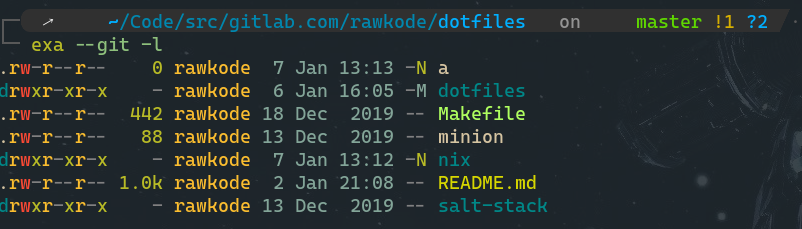
Pretty shiny, eh?
Things worth noting:
- Colours that distinguish directories, files, and executable files
- Colours for permissions, owners, and size of file
- Git status of each file in long output
Trees Everywhere
When working with code, it can be pretty nice to get a tree style look at the repository. Exa surpasses expectations here too.
First, here are a few aliases I have configured:
# lsTREE_IGNORE="cache|log|logs|node_modules|vendor"
alias ls=' exa --group-directories-first'alias la=' ls -a'alias ll=' ls --git -l'alias lt=' ls --tree -D -L 2 -I ${TREE_IGNORE}'alias ltt=' ls --tree -D -L 3 -I ${TREE_IGNORE}'alias lttt=' ls --tree -D -L 4 -I ${TREE_IGNORE}'alias ltttt=' ls --tree -D -L 5 -I ${TREE_IGNORE}'
Let me explain:
--tree- Enables Tree display-D- Show directories only (Useful for large trees)-L n- How many levels deep to display-I ${TREE_IGNORE}- This omits/hides common vendor directories, as defined in the variable above the aliases
Here’s a short asciinema of me using the lt, ltt, and lttt aliases: